Waterfox Essentials: Manage preferences and add-ons, Connection settings in Waterfox

Your organization or Internet service provider may offer or require you to use a proxy. A proxy acts as an intermediary between your computer and the Internet. It intercepts all requests to the Internet to see if it can fulfill the request using its cache. Proxies are used to improve performance, filter requests, and hide your computer from the Internet to improve security. Proxies are often part of corporate firewalls.

Connection settings to use a proxy can be set in Waterfox Options as follows:

  1. Click the menu buttonand select Settings.
  2. In the General panel, go to the Network Proxy section.
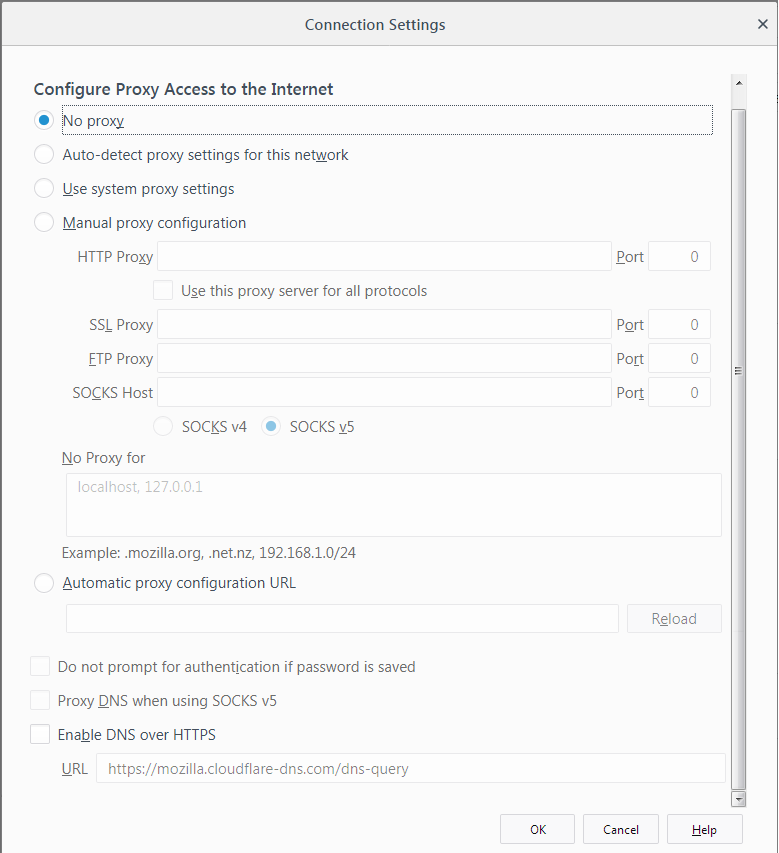
  3. Click Settings…. The Connection Settings dialog will open.Fx63ConnectionSettings
  • No proxy: Choose this if you don’t want to use a proxy.
  • Auto-detect proxy settings for this network: Choose this if you want Waterfox to automatically detect the proxy settings for your network.
  • Use system proxy settings: Choose this if you want to use the proxy settings configured for your operating system.
  • Manual proxy configuration: Choose this if you have a list of one or more proxy servers. Ask your system administrator for the configuration information. Each proxy requires a hostname and a port number.
    • If the same proxy name and port number are used for all protocols, check Use this proxy server for all protocols.
    • No Proxy For: List of hostnames or IP addresses that will not be proxied. Use <local/> to bypass proxying for all hostnames which do not contain periods.
  • Automatic proxy configuration URL: Choose this if you have a proxy configuration (.pac) file. Enter the URL and click okay to save changes and load the proxy configuration. file: and data: schemes can also be used here (e.g. file:///c:/proxy.pac or data:,function FindProxyForURL(){return "HTTPS example.com:3443";}).
    • Reload: The reload button will load the currently available proxy configuration.

Info

The Connection Settings dialog will also show extensions that control how Waterfox connects to the internet. You can disable these extensions by clicking Disable Extension.

Comments

Popular posts from this blog

Windows Media Player 12 Themes for Windows 7

Bored of your default Windows Media Player Skins?. Grab some fresh and new Windows Media Player 12 themes for Windows 7 ! Windows Media Player 12 Codecs Windows Media Player 12 comes with support for DivX and MP4, but it still lacks supports for many other video formats. (amr | mpc | ofr | divx | mka | ape | flac | evo | flv | m4b | mkv | ogg | ogv | ogm | rmvb | xvid)ù A popular codec pack can be downloaded here and here . Windows Media Player 12 Skins The following skin packages includes some really awesome themes for your Windows Media Player: Alienware Theme Batman Theme Catwoman Theme Darkstar Theme Half-Life Theme Halo 2 Theme The Last Samurai Theme Stalker Theme XBOX Theme XSN Sports Them Download Windows Media Player Themes Pack 1 (70 Skins) Download Windows Media Player Themes Pack 2 (12 Skins) New Year Theme 2010 for Windows 7 This theme can be downloaded for free from uploaded.to Custom Search If you liked this article, subscribe t...

Basic PC General Concepts and Terminology in Windows.

If you're not totally familiar with the various components of a modern PC, then this chapter will help you understand some of the common terminology used throughout the guide and what  each hardware component does in layman's terms. Note that I use a human body analogy to describe the function of C hardware components to hopefully clarify their functionality. Experienced PC users can skip this chapter. Bits and Bytes. You will often see the terms Bits, Bytes, Kilobytes, Megabytes and Gigabytes (or their abbreviations) being thrown around in guides such as this one. A Bit is the lowest form of computer information and  can take the value 0 or 1 (i.e. Off or On). All computer functionality is derived from the behavior of Bits. For our purposes, the main conversion factors you need to know are: 8 bits (b) = 1 Byte (B) 1,024 Bytes = 1 Kilobyte (KB) 1,024 Kilobytes (KB) = 1 Megabyte (MB) 1,024 Mega bytes (MB) = 1 Gigabyte (GB) Note in particular that the general con...

Windows 7 consumer security software providers.

We recommend that you install security software to help protect your computer from viruses and other security threats, and that you keep your security software up to date. Some companies use products that appear to be antivirus programs to install viruses or malware on your computer. When you install the program, you might also be installing the virus or other malware, without knowing it. Many companies, including those listed on this page, distribute antivirus programs. You should carefully investigate the source of antivirus and other products before downloading and installing them. The companies listed below provide consumer security software that is compatible with Windows 7. Just click the company name to see the Windows 7-compatible product they offer. For business security software that is compatible with Windows 7, please visit the Windows 7 Compatibility Center or contact your security vendor of choice. Important: Before you install antivirus software, check to make s...