Waterfox Essentials: Export login data from Waterfox

If you want to back up your saved usernames and passwords or move them to a different application, the Waterfox password management feature allows you to export this data to a .csv (comma separated values) file.

Caution

Your passwords in the exported file will not be encrypted and will be in a readable form to anyone who can view this file. Do not upload online, email or share the exported file. Delete this file when finished.

You can also import login data from another browser.

Export usernames and passwords

  1. Click the menu button menu button to open the menu panel.
  2. Click Logins and Passwords. The Waterfox about:logins page will open in a new tab.
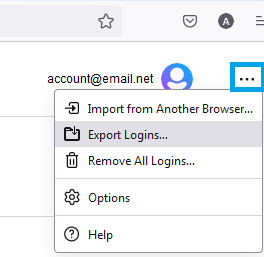
  3. Click the logins menu icon (three dots), then click Export Logins….Fx89logins3-dotMenuExport-win
  4. A dialog box will appear to remind you that passwords are saved as readable text. Click the Export… button to continue.
    • You may be prompted to enter your Primary Password, if enabled, when accessing stored passwords.
  5. You can choose the file name and location where this exported data will be saved.

Source

Comments

Popular posts from this blog

Windows Media Player 12 Themes for Windows 7

Bored of your default Windows Media Player Skins?. Grab some fresh and new Windows Media Player 12 themes for Windows 7 ! Windows Media Player 12 Codecs Windows Media Player 12 comes with support for DivX and MP4, but it still lacks supports for many other video formats. (amr | mpc | ofr | divx | mka | ape | flac | evo | flv | m4b | mkv | ogg | ogv | ogm | rmvb | xvid)ù A popular codec pack can be downloaded here and here . Windows Media Player 12 Skins The following skin packages includes some really awesome themes for your Windows Media Player: Alienware Theme Batman Theme Catwoman Theme Darkstar Theme Half-Life Theme Halo 2 Theme The Last Samurai Theme Stalker Theme XBOX Theme XSN Sports Them Download Windows Media Player Themes Pack 1 (70 Skins) Download Windows Media Player Themes Pack 2 (12 Skins) New Year Theme 2010 for Windows 7 This theme can be downloaded for free from uploaded.to Custom Search If you liked this article, subscribe t...

Basic PC General Concepts and Terminology in Windows.

If you're not totally familiar with the various components of a modern PC, then this chapter will help you understand some of the common terminology used throughout the guide and what  each hardware component does in layman's terms. Note that I use a human body analogy to describe the function of C hardware components to hopefully clarify their functionality. Experienced PC users can skip this chapter. Bits and Bytes. You will often see the terms Bits, Bytes, Kilobytes, Megabytes and Gigabytes (or their abbreviations) being thrown around in guides such as this one. A Bit is the lowest form of computer information and  can take the value 0 or 1 (i.e. Off or On). All computer functionality is derived from the behavior of Bits. For our purposes, the main conversion factors you need to know are: 8 bits (b) = 1 Byte (B) 1,024 Bytes = 1 Kilobyte (KB) 1,024 Kilobytes (KB) = 1 Megabyte (MB) 1,024 Mega bytes (MB) = 1 Gigabyte (GB) Note in particular that the general con...

Windows 7 consumer security software providers.

We recommend that you install security software to help protect your computer from viruses and other security threats, and that you keep your security software up to date. Some companies use products that appear to be antivirus programs to install viruses or malware on your computer. When you install the program, you might also be installing the virus or other malware, without knowing it. Many companies, including those listed on this page, distribute antivirus programs. You should carefully investigate the source of antivirus and other products before downloading and installing them. The companies listed below provide consumer security software that is compatible with Windows 7. Just click the company name to see the Windows 7-compatible product they offer. For business security software that is compatible with Windows 7, please visit the Windows 7 Compatibility Center or contact your security vendor of choice. Important: Before you install antivirus software, check to make s...