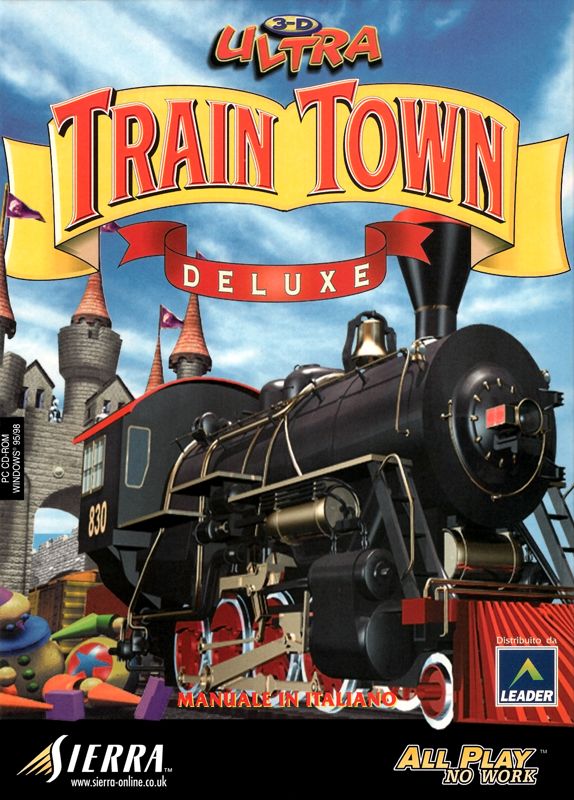
3D Ultra Lionel Traintown is a 1999 third-person railroad game by Sierra On-Line under the Sierra Attractions casual games label, licensed by Lionel, LLC. It consists of train layouts, some of which the player can edit.
The locomotives include a Union Pacific EMD SW1500 shunting engine, an Atchison, Topeka and Santa Fe Railway F3A diesel locomotive (generally used to pull passenger trains), a 2-8-0 steam locomotive, and a 1950s passenger car.
An enhanced version, titled 3D Ultra Lionel Traintown Deluxe, was released the following year.
Gameplay: There are six difficulty levels, known as task lists. Each difficulty level has 11 jobs, with a twelfth job unlocking later. Most jobs involve picking up and delivering cargo using freight and passenger cars. Other tasks involve moving numbered freight cars to solve valid addition, subtraction, multiplication, and division equations at difficulty levels ranging from kindergarten to fifth grade. There are memory games, stick-picking, hangman, Tower of Hanoi, and anagram puzzles with set time limits. The game features seven different environments, including a desert, the Arctic, a living room, and the moon.
3D Ultra Lionel TrainTown (and TrainTown Deluxe) was released in 1999–2000 for Windows 95/98. Because the game relies on legacy 16-bit DirectDraw graphics and older installer frameworks, running it natively on modern 64-bit systems (Windows 10 or Windows 11) requires a graphic wrapper like DxWnd or dgVoodoo2.
1.Download the Game Files:Acquire the game ISO or pre-packaged archive.
Because the game is long out of print and not sold on modern storefronts like Steam or GOG, you will need to obtain the original installer files or ISO image:
-
Internet Archive: Search for 3D Ultra Lionel TrainTown or 3D Ultra Lionel TrainTown Deluxe on Internet Archive (
archive.org) to download the full CD ISO image. -
Abandonware Repositories: Preservation sites (such as The Collection Chamber) offer pre-configured Win95/DOSBox builds that include all original game files.
2.Install or Extract the Game:Mount the ISO and run setup or copy files.
-
If you downloaded an ISO file, right-click it in Windows 10/11 and select Mount to open the virtual drive.
-
Open the mounted drive, right-click
SETUP.EXE(orINSTALL.EXE), and choose Run as administrator. -
If the installer fails to launch, right-click
SETUP.EXE, go to Properties > Compatibility, check Run this program in compatibility mode for: Windows 98 / Windows Me, and run it again. -
Install the game to a simple directory path like
C:\Games\TrainTownto avoid administrative permission restrictions inProgram Files.
3.Configure Display Wrapper (DxWnd):Fix 16-bit color rendering and black screens on modern GPUs.
Since modern graphics drivers no longer natively support legacy 16-bit paletted DirectDraw modes, the game will crash or display a black screen without a wrapper:
-
Download DxWnd from SourceForge and extract the archive.
-
Launch
dxwnd.exeas Administrator. -
Click File > Import... and browse to DxWnd's
exportsfolder. Select 3D Ultra Lionel TrainTown.dxw if available, or add a new profile via Edit > Add. -
Right-click the game profile in DxWnd and select Modify:
-
Path: Click the folder icon to select
TRAINTOWN.EXEinside your installed game folder. -
Main Tab: Check Run in window, select Desktop center, and set initial resolution to
800x600. -
Video Tab: Enable Keep aspect ratio and Thin frame.
-
DirectX Tab: Set Color Emulation to 16BPP RGB 565.
-
-
Click OK and save your configuration (File > Save).
4.Set Compatibility Flags (Alternative Method):Quick built-in Windows fallback.
If you prefer not to use DxWnd, you can attempt to run the game using built-in Windows compatibility flags:
-
Go to your installed game directory and right-click
TRAINTOWN.EXE. -
Select Properties and navigate to the Compatibility tab.
-
Check Run this program in compatibility mode for: Windows 98 / Windows Me.
-
Check Reduced color mode and select 16-bit (65536) color.
-
Check Run this program as an administrator and click Apply.
5.Launch & Learn the Controls:Master track switching, speed, and emergency stops.
Launch the game through DxWnd by double-clicking its icon (or double-clicking TRAINTOWN.EXE directly if using compatibility mode).
-
Track Switching: Click directly on track switches to change train paths.
-
Speed & Direction: Click to the right of a locomotive to accelerate forward; click to the left to reverse. Clicking multiple times increases speed up to level 3.
-
Braking: Click directly on the moving engine or train car to apply the brakes.
-
Coupling & Uncoupling: Align cars slowly to couple them. Click the coupler link between cars to disconnect.
-
Emergency Stop: Press
Spacebarto immediately stop all moving trains. -
Interface Shortcuts: Press
Mfor map overview,Tto toggle the main toolbar, andOfor options.
Helpful Gameplay Tips & Cheats
-
Cheat Console: During an active job, press
Shift+\(to type the|pipe symbol). TypeBrainand pressEnterto instantly unlock the final job in the roster. -
Speed Management: Trains take time to decelerate due to momentum. Set track switches well ahead of time and apply brakes early to avoid derailments and crashes.
Comments
Post a Comment
Do not insert clickable links or your comment will be deleted. Checkbox Send me notifications to be notified of new comments via email.