Xbox Backward Compatibility on PC

La nostalgia llega a Windows 11: Microsoft recupera juegos clásicos de la primera  Xbox para PC

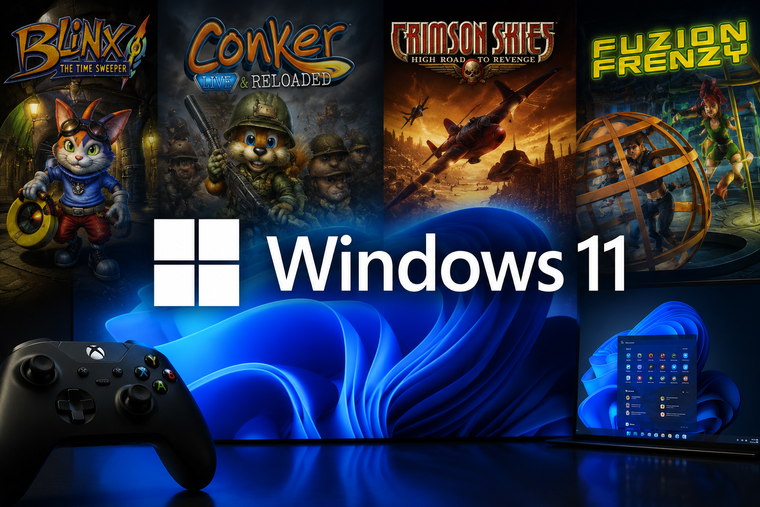
Microsoft introduced an official Xbox Backward Compatibility program on PC, bringing classic console games directly to Windows 11 PCs and Windows handheld devices (such as the ASUS ROG Ally and Xbox Ally X) through the Xbox App.

Currently Supported Games

The initiative launched with a select initial wave of classic Xbox titles:

  • BLiNX: The Time Sweeper

  • Conker: Live & Reloaded

  • Crimson Skies: High Road to Revenge

  • Fuzion Frenzy

Licensing & Access

  • Xbox Game Pass: Included across all Game Pass tiers.

  • Digital Ownership: If you already own a digital console license for a supported backward-compatible game, it carries over to PC via Xbox Play Anywhere.

  • Individual Purchases: Games can also be purchased standalone through the PC Xbox store.

Graphic & Platform Enhancements

The games run via a custom Microsoft-built translation layer with native PC enhancements:

  • Resolution & Filters: 4x resolution upscaling, anisotropic filtering, and improved anti-aliasing.

  • Display Controls: V-Sync toggles with support for both Fullscreen and Windowed display modes.

  • Customization: Dedicated audio and multi-language configuration options.

  • Platform Integration: Xbox Achievements support.

System Requirements

Component
Minimum Specs
Recommended Specs

OS
Windows 11
Windows 11

CPU
Intel Core i3-8100 / AMD Ryzen 3 1200
Intel Core i5-10400 / AMD Ryzen 5 3600

GPU
NVIDIA GTX 950 / AMD Radeon RX 550 / Intel Arc A310
NVIDIA GTX 1070 Ti / AMD Radeon RX 6800 / Intel Arc A770

RAM
8 GB
8 GB

DirectX
DirectX 12 (Hardware Feature Level 11)

Xbox 360 Compatibility & Future Expansion

Analysis of the PC compatibility layer (code-named XEO3 / Fission) confirms that the engine supports Xbox 360 system architecture in addition to original Xbox titles. Because the translation system handles binary conversion at the OS level, future library expansions will not require developers to manually re-code or rebuild original game releases for modern PC hardware.

Comments

Popular posts from this blog

Windows Media Player 12 Themes for Windows 7

Bored of your default Windows Media Player Skins?. Grab some fresh and new Windows Media Player 12 themes for Windows 7 ! Windows Media Player 12 Codecs Windows Media Player 12 comes with support for DivX and MP4, but it still lacks supports for many other video formats. (amr | mpc | ofr | divx | mka | ape | flac | evo | flv | m4b | mkv | ogg | ogv | ogm | rmvb | xvid)ù A popular codec pack can be downloaded here and here . Windows Media Player 12 Skins The following skin packages includes some really awesome themes for your Windows Media Player: Alienware Theme Batman Theme Catwoman Theme Darkstar Theme Half-Life Theme Halo 2 Theme The Last Samurai Theme Stalker Theme XBOX Theme XSN Sports Them Download Windows Media Player Themes Pack 1 (70 Skins) Download Windows Media Player Themes Pack 2 (12 Skins) New Year Theme 2010 for Windows 7 This theme can be downloaded for free from uploaded.to Custom Search If you liked this article, subscribe t...

Windows 7 Keyboard Shortcuts.

Keyboard shortcuts are combinations of two or more keys that, when pressed, can be used to perform a task that would typically require a mouse or other pointing device. Keyboard shortcuts can make it easier to interact with your computer, saving you time and effort as you work with Windows and other programs.  Most programs also provide accelerator keys that can make it easier to work with menus and other commands. Check the menus of programs for accelerator keys.  If a letter is underlined in a menu, that usually means that pressing the Alt key in combination with the underlined key will have the same effect as clicking that menu item. Pressing the Alt key in some programs, such as Paint and WordPad, shows commands that are labeled with additional keys that you can press to use them. Dialog box keyboard shortcuts. The following table contains keyboard shortcuts for use in dialog boxes. Press this key To do this: Ctrl+Tab Move forward through tabs...

Windows 7 consumer security software providers.

We recommend that you install security software to help protect your computer from viruses and other security threats, and that you keep your security software up to date. Some companies use products that appear to be antivirus programs to install viruses or malware on your computer. When you install the program, you might also be installing the virus or other malware, without knowing it. Many companies, including those listed on this page, distribute antivirus programs. You should carefully investigate the source of antivirus and other products before downloading and installing them. The companies listed below provide consumer security software that is compatible with Windows 7. Just click the company name to see the Windows 7-compatible product they offer. For business security software that is compatible with Windows 7, please visit the Windows 7 Compatibility Center or contact your security vendor of choice. Important: Before you install antivirus software, check to make s...