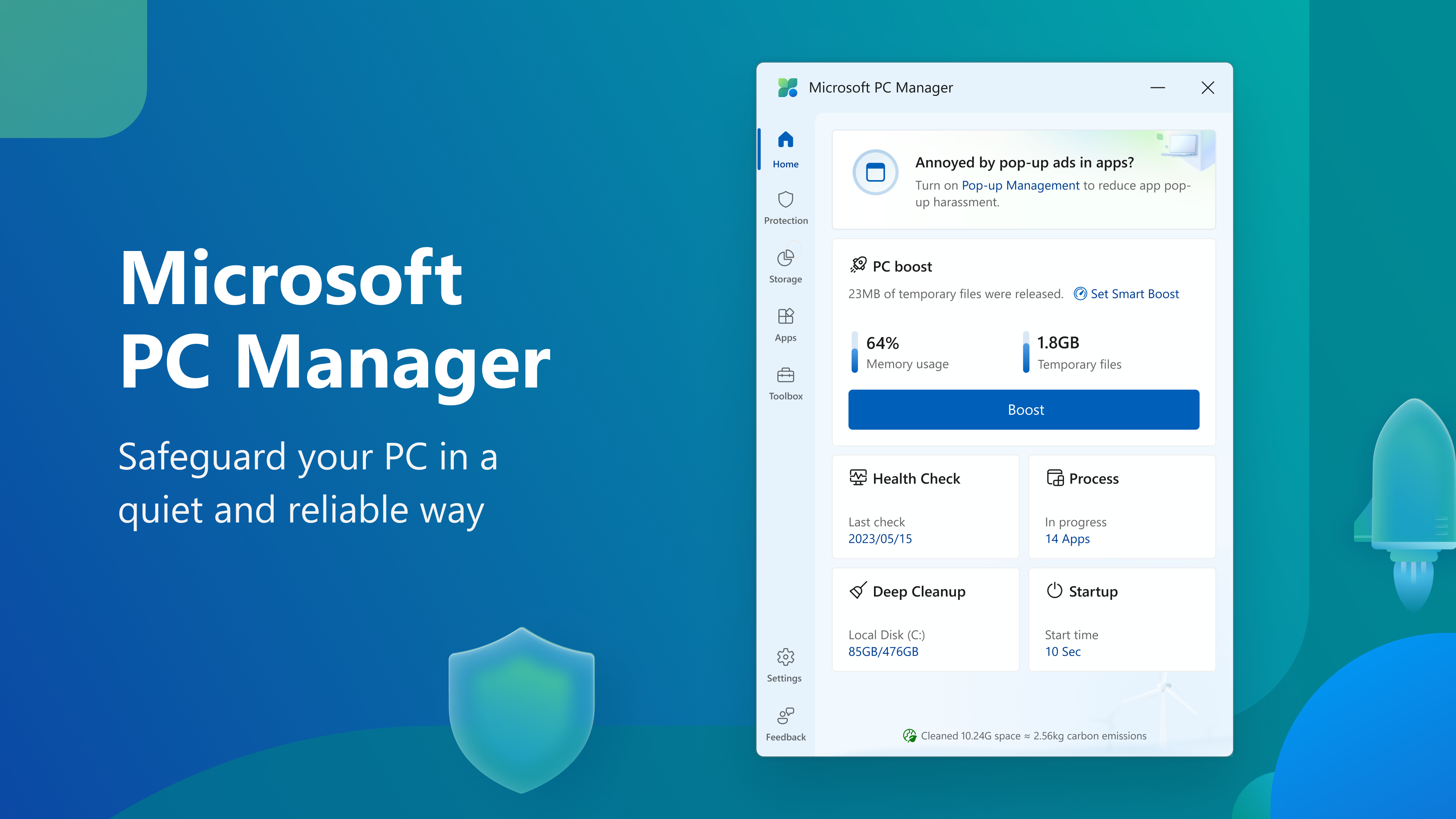
Microsoft PC Manager in Windows 11

Microsoft PC Manager: descarga e instalaciรณn gratuitas en Windows |  Microsoft Store

Microsoft PC Manager is an official desktop utility developed by Microsoft (available via the Microsoft Store) that acts as a centralized dashboard for system maintenance, memory management, security checks, and workflow utilities.

Unlike third-party "cleaner" software, PC Manager relies entirely on native Windows APIs, making it a safe alternative to aggressive registry tweaks or dubious optimizer software.

Key Features & Capabilities
  • One-Click PC Boost (RAM & Temp Files)

    Flushes temporary cache files and terminates non-essential background tasks to instantly free up operational RAM. It can also be set to Smart Boost, which automates cleanup when RAM usage climbs past a specific threshold.

  • Health Check & Diagnostics

    Scans for system junk, highlights startup programs slowing down boot times, checks for driver or security vulnerabilities, and recommends safe maintenance actions in a single sweep.

  • Deep Storage Cleanup

    Acts as an extension of Windows Storage Sense. It locates large, forgotten files (videos, installers), identifies duplicate files, clears Windows Update update residue, and safely removes leftover installer packages.

  • Process & Startup App Management

    Provides a streamlined, low-complexity view of running applications and startup items—allowing you to end resource-heavy processes without wading through the full Task Manager interface.

  • Pop-up & Ad Management

    Includes a built-in toggle to block aggressive application pop-up windows inside third-party programs.

  • Desktop Floating Toolbar (Toolbox)

    Adds a small overlay bar to the desktop containing quick-access utilities: floating RAM usage monitor, screenshot tool, edge browser tools, volume control, and custom app shortcuts.

How to Get It
  1. Open the Microsoft Store on Windows 11.

  2. Search for Microsoft PC Manager.

  3. Click Get / Install (it requires Windows 10 build 19042 or higher / Windows 11).

Summary: Pros & Cons

Strengths
Considerations

Safe & Native: Won't break Windows or alter critical registry keys.
Prompts Default Settings: May occasionally prompt to set Microsoft Edge/Bing as defaults under system repair suggestions.

Lightweight: Low idle memory usage.
Redundant for Power Users: Most underlying features exist natively in Windows (Task Manager, Storage Sense, Defender).

Centralized: Puts maintenance features under one clean UI.
Store App Requirement: Needs the Microsoft Store for updates and installation.

Comments

Popular posts from this blog

Windows 7 Keyboard Shortcuts.

Keyboard shortcuts are combinations of two or more keys that, when pressed, can be used to perform a task that would typically require a mouse or other pointing device. Keyboard shortcuts can make it easier to interact with your computer, saving you time and effort as you work with Windows and other programs.  Most programs also provide accelerator keys that can make it easier to work with menus and other commands. Check the menus of programs for accelerator keys.  If a letter is underlined in a menu, that usually means that pressing the Alt key in combination with the underlined key will have the same effect as clicking that menu item. Pressing the Alt key in some programs, such as Paint and WordPad, shows commands that are labeled with additional keys that you can press to use them. Dialog box keyboard shortcuts. The following table contains keyboard shortcuts for use in dialog boxes. Press this key To do this: Ctrl+Tab Move forward through tabs...

Windows 7 consumer security software providers.

We recommend that you install security software to help protect your computer from viruses and other security threats, and that you keep your security software up to date. Some companies use products that appear to be antivirus programs to install viruses or malware on your computer. When you install the program, you might also be installing the virus or other malware, without knowing it. Many companies, including those listed on this page, distribute antivirus programs. You should carefully investigate the source of antivirus and other products before downloading and installing them. The companies listed below provide consumer security software that is compatible with Windows 7. Just click the company name to see the Windows 7-compatible product they offer. For business security software that is compatible with Windows 7, please visit the Windows 7 Compatibility Center or contact your security vendor of choice. Important: Before you install antivirus software, check to make s...

Windows Media Player 12 Themes for Windows 7

Bored of your default Windows Media Player Skins?. Grab some fresh and new Windows Media Player 12 themes for Windows 7 ! Windows Media Player 12 Codecs Windows Media Player 12 comes with support for DivX and MP4, but it still lacks supports for many other video formats. (amr | mpc | ofr | divx | mka | ape | flac | evo | flv | m4b | mkv | ogg | ogv | ogm | rmvb | xvid)รน A popular codec pack can be downloaded here and here . Windows Media Player 12 Skins The following skin packages includes some really awesome themes for your Windows Media Player: Alienware Theme Batman Theme Catwoman Theme Darkstar Theme Half-Life Theme Halo 2 Theme The Last Samurai Theme Stalker Theme XBOX Theme XSN Sports Them Download Windows Media Player Themes Pack 1 (70 Skins) Download Windows Media Player Themes Pack 2 (12 Skins) New Year Theme 2010 for Windows 7 This theme can be downloaded for free from uploaded.to Custom Search If you liked this article, subscribe t...