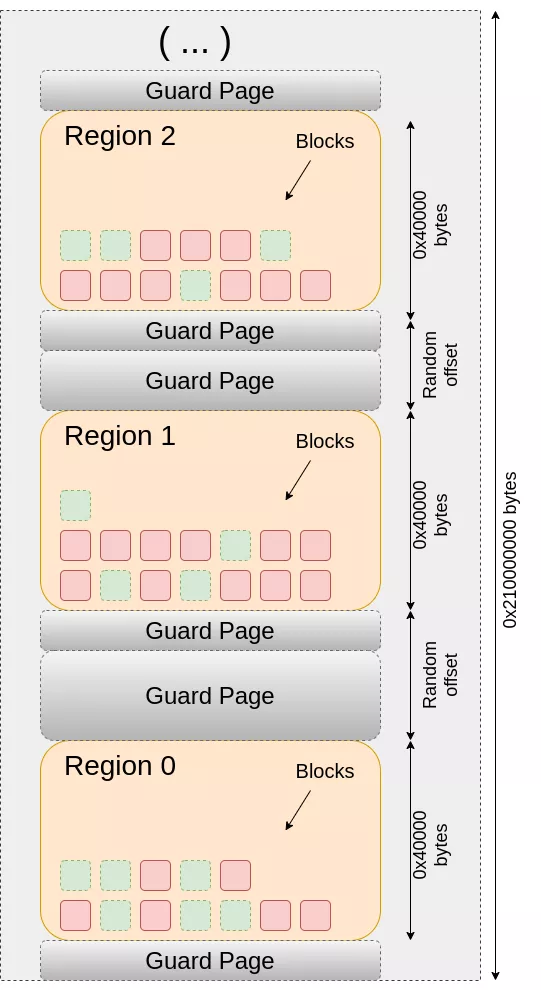
The Scudo Hardened Allocator (the default dynamic heap allocator in Android Bionic and LLVM compiler-rt) integrates directly with ARMv9 Memory Tagging Extension (MTE) hardware to prevent heap buffer overflows and Use-After-Free (UAF) vulnerabilities.
Because MTE hardware tags physical memory in 16-byte granules, Scudo enforces a strict 16-byte minimum alignment on all heap allocations.
1. What Happens During malloc(size)
When an application calls malloc(), Scudo executes a four-step hardware tagging sequence:
                  Step 1: IRG                      Step 2 & 3: STGP / STG                     Step 4
+---------------------------------------------+  +---------------------------------------+  +----------------------+
| Generate Random Tag (e.g., 0x9) for Pointer |  | Write Tag 0x9 to Physical RAM Granules|  | Return Tagged Pointer|
|   Upper Byte: [0x09][Address Bits 0..59]    |  |  [Granule 0: 0x9] [Granule 1: 0x9]    |  |   0x09000073c323d590 |
+---------------------------------------------+  +---------------------------------------+  +----------------------+
Step 1: Chunk Header Isolation & Tag 0
-
Scudo chunks consist of a 16-byte Chunk Header followed by the user payload.
-
To prevent user pointers from corrupting allocator metadata, the 16-byte Chunk Header is tagged with Tag
0x0(or an internal allocator tag).
Step 2: Pointer Tag Generation (IRG)
-
Scudo calculates the required payload size, rounded up to the nearest multiple of 16 bytes.
-
It executes the ARM hardware instruction
IRG(Insert Random Tag) to pick a random 4-bit tag (values0x1to0xF) and insert it into bits 56–59 of the base pointer register. -
Spatial Overflow Prevention: Scudo's tag generator checks that adjacent chunks in memory do not receive the same tag, ensuring $100\%$ detection for spatial buffer overflows extending into neighboring allocations.
Step 3: Tagging Physical Memory (STG / STGP)
-
The allocator must write the generated 4-bit tag to the CPU's physical memory tag storage for all 16-byte granules spanning the payload:
-
Standard Tagging: Scudo uses
STG(Set Tag) orST2G(Set 2 Tags) in a tight loop across the payload address range. -
Combined Tagging & Zero-Initialization: If the allocation requires zeroing (e.g.,
callocorZeroContentsflags), Scudo usesSTGP(Set Tag and Pair).STGPwrites the MTE tag to the granule while simultaneously zeroing 16 bytes of payload data in a single hardware cycle.
-
Step 4: Returning the Tagged Pointer
-
Scudo returns the $64$-bit tagged pointer (e.g.,
0x09000073c323d590) to the caller. Any load or store via this pointer automatically validates that its top-byte tag (0x9) matches the memory granule tag (0x9).
2. What Happens During free(ptr)
When free(ptr) is called, Scudo invalidates any dangling references to eliminate Use-After-Free (UAF) vulnerabilities.
                  Step 1: Re-Tag                   Step 2: STG Update                     Step 3: Quarantine / Freelist
+---------------------------------------------+  +----------------------------------+  +---------------------------------+
| Generate NEW Tag (0x4 != Old Tag 0x9)       |  | Overwrite Physical RAM Granules  |  | Old Pointer 0x09... now fails   |
|   Old Pointer: 0x09...                      |  | with Tag 0x4                     |  | on load/store (Tag 0x9 != 0x4)  |
|   New Tag:     0x04...                      |  |  [Granule 0: 0x4] [Granule 1: 0x4|  |                                 |
+---------------------------------------------+  +----------------------------------+  +---------------------------------+
Step 1: Generating a Distinct New Tag
-
Scudo extracts the old tag (
0x9) from the pointer. -
It calls
IRGto generate a new, distinct 4-bit tag (e.g.,0x4). -
Rule: Scudo guarantees the new tag is never equal to the old tag being freed.
Step 2: Overwriting Physical Memory Tags
-
Scudo immediately executes
STG/ST2Gloops across all 16-byte granules of the freed chunk, updating physical memory tags to the new tag (0x4).
Step 3: Immediate UAF Invalidation
-
Because the caller’s dangling pointer still holds the old tag (
0x9), but physical memory now holds0x4, any subsequent attempt to read or write using the dangling pointer triggers an immediateSEGV_MTESERRhardware crash. -
The freed chunk is then placed into Scudo's quarantine/freelist for future reuse.
3. Summary of ARM Assembly Instructions Used by Scudo
ARM Instruction
Name
Scudo Usage
IRG x0, x1
Insert Random Tag
Generates a random 4-bit tag in the top byte of destination register x0 derived from base register x1.
STG x0, [x1]
Set Tag
Stores the 4-bit tag in x0 to the physical memory tag array for the 16-byte granule at x1.
ST2G x0, [x1]
Set 2 Tags
Stores the tag in x0 across two contiguous 16-byte granules (32 bytes) for faster bulk tagging.
STGP x0, x2, x3, [x1]
Set Tag and Pair
Stores the tag in x0 to the granule at x1 while zero-filling registers x2 and x3 into payload memory in a single cycle.
LDG x0, [x1]
Load Tag
Reads the physical memory tag at x1 into register x0 (used when Scudo inspects existing memory tags during realloc/reclaim).
4. Special Allocator Edge Cases
-
Memory Released to OS (
madvise(DONTNEED)):When Scudo releases unused Primary/Secondary pages back to the Linux kernel via
madvise, physical memory tags are reset to0x0by the OS kernel. When the page is later re-allocated, Scudo treats it as untagged memory and applies a fresh random tag. -
Secondary Allocations (
mmap):Large allocations serviced via OS
mmapare surrounded by unmapped guard pages. Scudo tags the large payload region using random tags or relies on guard pages to trap out-of-bounds accesses beyond page boundaries.
Comments
Post a Comment
Do not insert clickable links or your comment will be deleted. Checkbox Send me notifications to be notified of new comments via email.